
Vendor Query Help
The Vendor Payments website allows departments to query payments made to vendors since September 1, 2008 by Texas Tech University, Texas Tech University System Administration, and Texas Tech University Health Sciences Center. This document will provide information and definitions for each section and the fields within the section under the Vendor Payment Details. The last half of the document provides examples and definitions of the documents referenced in the Vendor Payments website. This section will also help you identify the responsible area within the organization.
Vendor Payment Details
The Vendor Payment Details page provides three sections: scheduled payments, payment history, and outstanding encumbrances.
Scheduled Payments
The Scheduled Payments section details the payments that have been entered and scheduled to pay in the future. The checks for these invoices have not been cut and/or mailed. This section may also include any credit memos that may have been issued by the vendor to Texas Tech.
The following are the fields and their definitions for this section:
Invoice: Document entered by the Texas Tech payables office that initiates the processing of a check.
Vend Inv: Typically, the number referenced on the invoice received from the vendor. It may also reference a specific contract number, a purchase order number, or additional information that the Accounts Payable offices deem appropriate for the vendor to match the payments to the vendor invoices. This field also prints on the checks.
Address: Mailing address for the check.
Trans Date: Date the expense will hit the Texas Tech ledgers.
Due Date: Date the check will process.
PO: Texas Tech encumbrance number/purchase order number associated with the payment (if applicable).
Amount: Amount of the invoice. If multiple invoices to a vendor are entered on the same day, they may cut on a single check. Therefore, it is the amount of the invoice listed and not the amount of the check.
Payment History
The Payment History section details the payments that have produced checks.
The following are the fields and their definitions for this section:
Invoice: Document entered by a Texas Tech Accounts Payable office that initiates the processing of a check.
Vend Inv: Typically, the number referenced on the invoice received from the vendor. It may also reference a specific contract number, a purchase order number, or additional information that the Accounts Payable offices deem appropriate for the vendor to match the payments to the vendor invoices. This field also prints on the checks.
Address: Mailing address for the check.
Check Number: Check number processed for the payment. One check may represent one or more Banner invoices and/or vendor invoices.
Check Date: Date the check was processed.
Cleared Date: Date the check cleared the bank (TTU and TTUSA checks do not currently provide cleared dates. The Information Systems office is working to resolve the issue).
PO: Encumbrance number/purchase order number associated with the payment (if applicable).
Inv Cancel Date: Date the invoice was cancelled by Texas Tech personnel in the accounting system.
Check Cancel Date: Date that Texas Tech personnel cancelled the check in the accounting system and/or issued a Stop Payment with the bank.
Net Amount: Amount of the invoice. If multiple Banner invoices for a vendor are entered on the same day, they may cut on a single check. Therefore, it is the amount of the Banner invoice listed and not the amount of the check.
Encumbrance Information
The Encumbrance Information relates to the open general encumbrances and purchase orders on the books of Texas Tech. The encumbrances/purchase orders reserve funds for future payments.
The following are the fields and their definitions for this section:
Encb: Texas Tech encumbrance number/purchase order number associated with the payment.
Trans Date: Date the funds were reserved from the department's budget.
Type: Type of encumbrance. The values are E for encumbrance, P for purchase order, R for requisition, L for labor, and M for memo. The two most common are E and P.
Address: Address associated with an encumbrance/purchase order, if any.
Cancel Date: Date the encumbrance/purchase order was cancelled on the Texas Tech ledgers.
Original Amt: Amount of the encumbrance/purchase order at the time of creation.
Current Adj: Any increases or decreases to the original encumbrance/purchase order amount. The requests for an adjustment are typically initiated by the department.
Current Liq'd: Any liquidations to the current encumbrance balance. Liquidations are either invoices that were paid against the encumbrance/purchase order or the amount manually liquidated by the purchasing department when closing an encumbrance/purchase order.
Outstanding Amt: Amount remaining on the encumbrance/purchase order.
Document Identification
The Vendor Payment Details screen references several different types of documents initiated by Texas Tech University (TTU), Texas Tech University Systems Administration (TTUSA), Texas Tech University Health Sciences Center (TTUHSC), and Texas Tech University Health Sciences Center El Paso (TTHUSC - ELP) ranging from purchase orders to checks. This section will provide information to help you identify the type of document and the responsible area within the organization.
Purchase Orders
Purchase orders reserve a portion of a departmental budget to fulfill obligations to 3rd party vendors and service departments.
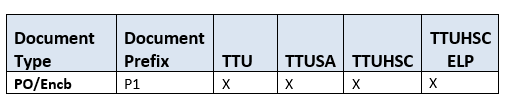
Purchase orders begin with a P and have a total of 8 alpha-numeric characters. There is nothing within the purchase order number that distinguishes it among TTU, TTUSA, and TTUHSC.
Invoices
Invoices are fed to our finance system from TechBuy, entered manually by the Accounts Payable offices or through outside applications that feed into the finance system. All invoices initiate the issuance of a check/direct deposit/SUA. Often invoices reference a purchase order and subsequently liquidate all or a portion of the encumbrance. However, an invoice can also be entered without a purchase order.
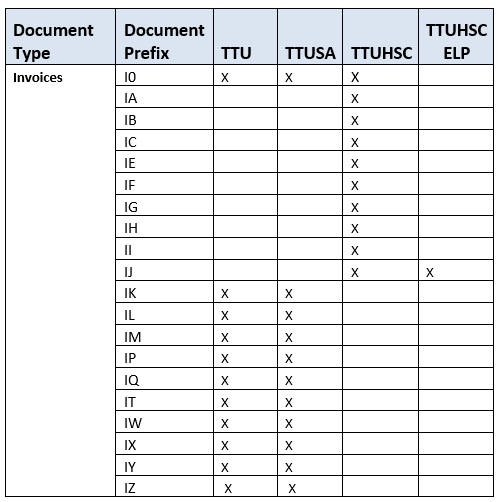
Invoices fed into the finance system from TechBuy begin with V8 and have a total of 8 characters. There is nothing within the Invoice number that distinguishes it amount TTU, TTUSA, TTUHSC and TTUHSC ELP.
Invoices fed into the finance system from outside applications (e.g., Travel System) will typically begin with an I followed by 7 additional characters that are often numeric. Unfortunately, these documents cannot be distinguished among TTU, TTUSA, and TTUHSC.
Invoices fed from MPIP Business Office begin with II for HSC MPIP refunds.
Invoices entered manually by the TTU and TTUSA Accounts Payable office begin with IK, IL, IM, IP, IQ, IT, IU, IV, IW, IX, IY, and IZ, then the Fiscal Year (FY) and four sequential numbers.
Checks and Direct Deposit Payments
TTU, TTUSA, and TTUHSC make payments using state warrants, checks, direct deposits, and SUAs.
State Warrants are checks issued by the State of Texas on behalf of the Institution. The check number will be alpha-numeric beginning with an alpha character followed by a numeric number. The second character will identify if the payment was initiated by TTU, TTUSA, or TTUHSC. Check numbers with an alpha in the first character and 1through 3 in the second character are issued by TTU (e.g., A3000024). Check numbers with an alpha in the first character and a 5 in the second character are issued by TTUSA (e.g., A5000365). Check numbers with an alpha in the first character and 7 through 9 in the second character are issued by TTUHSC (e.g., P9002510). Check numbers with an alpha in the first character and 4 or 6 in the second character are issued by TTUHSC ELP.
The check numbers issued by Texas Tech also identify if it belongs to TTU, TTUSA, TTUHSC or TTUHSC ELP. Check numbers beginning with numbers 1 through 3 are issued by TTU, beginning with 5 are issued by TTUSA, and beginning with numbers 6, 7 and 9 are issued by TTUHSC. Check numbers 4 and 8 as issued by TTUHSC ELP.
If a vendor opts to receive payment via direct deposit, the check number begins with the symbol ! (exclamation mark). There is nothing within the direct deposit number that distinguishes it among TTU, TTUSA, TTUHSC and TTUHSC ELP.
If a vendor opts to receive payment via SUA (Singe Use Account), the check number begins with the ^ (caret symbol). There is nothing within the SUA number that distinguishes it among TTU, TTUSA, TTUHSC and TTUHSC ELP.
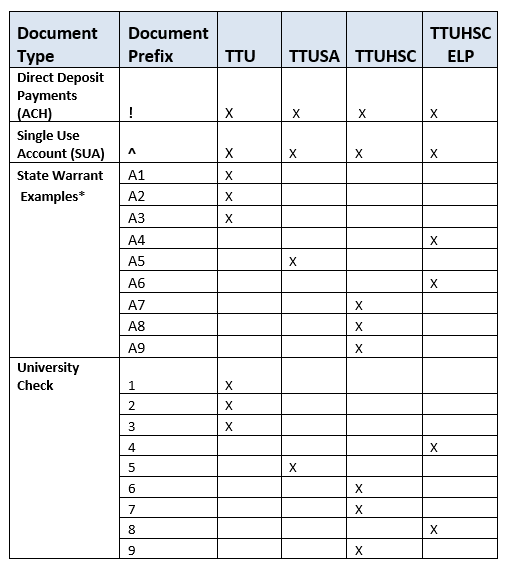
*Alpha character could be A through Z.
Contact
Finance Systems Management
-
Address:
3601 4th Street STOP 6209 | Lubbock, Texas 79430-6209 -
Email:
fsm@ttuhsc.edu