
PressWise User Guide
About PressWise
PressWise is the production and ordering system utilized by the TTUHSC Printing Center for customer orders. The system allows the Printing Center to control the orders from start to finish and also allows the customer to track the status of their order in real-time. Through PressWise, customers can order business cards, envelopes, and letterhead as well as anything else that has been added to their catalog.
How to Request a New User Login
Contact the Printing Center at printingcenter@ttuhsc.edu to request new user login information.
How to Place an Order from your Catalog
Business Cards
Log into the system and click Catalog.
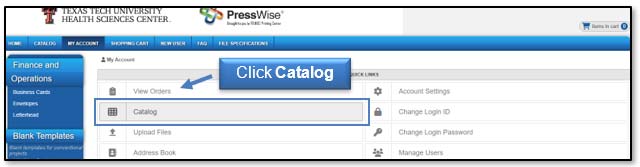
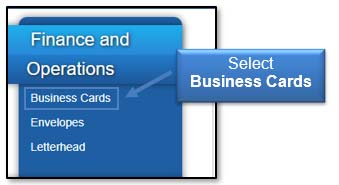
Select Business Cards from the appropriate header.
Select the appropriate business card from the available templates.
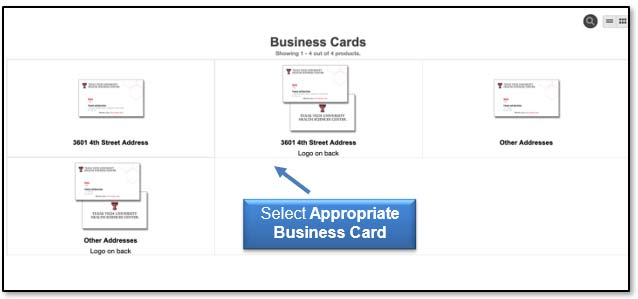
Note: Some cards are for Lubbock addresses and some are for Other Addresses. You can view that information below the thumbnail of the card.
Fill out the form with the appropriate information and click Update Image. Once the card looks the way you want, click Proceed to Order.
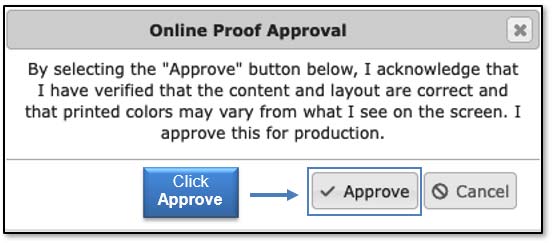
To approve your proof, click the Approve button.
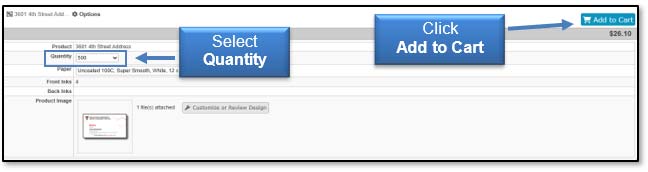
Select the quantity you would like to order and click Add to Cart in the upper left area of the page.
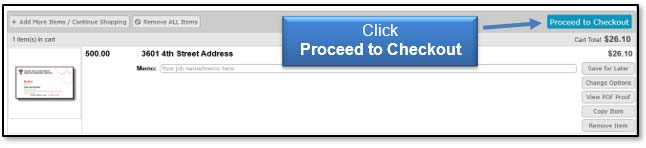
Then, select Proceed to Checkout.
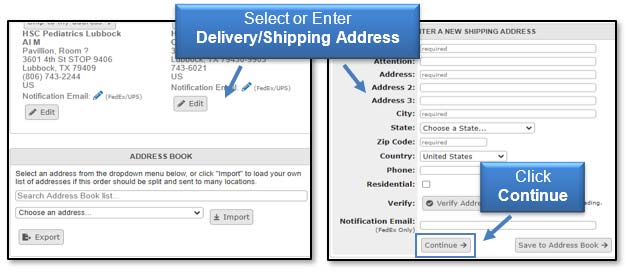
Select or enter your delivery or shipping information and then click Continue.
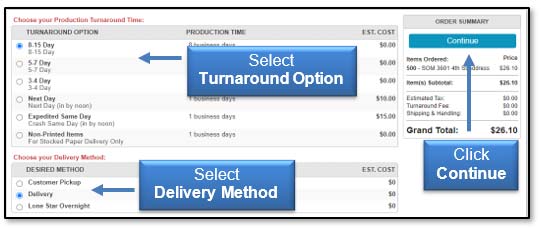
Select your desired turnaround time and desired delivery method and click Continue.
Enter your FOP and click Continue.
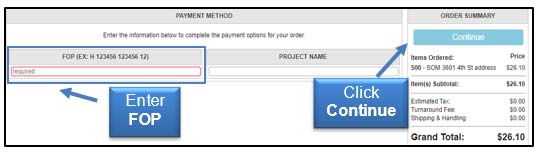
Click Place Your Order.
Envelopes
Most departments at TTUHSC and TTU have envelope templates in their catalogs.
To place an envelope order, log into PressWise. Click Catalog, choose Envelopes from the appropriate header, and select the envelope needed.
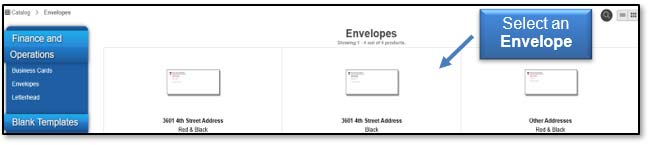
Note: There are separate templates for black ink-only envelopes and full-color envelopes.
Fill out the form for the envelope. Fields marked with a red asterisk are required. Click Update Image to view the updated personalized design. Once the envelope looks the way you want, click Proceed to Order.
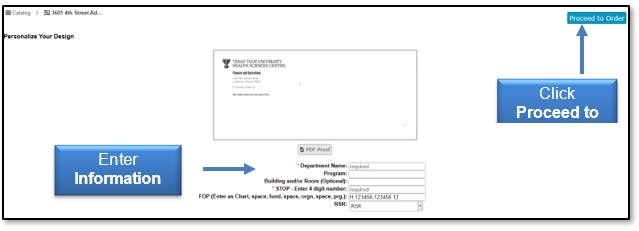
Approve your proof, select the quantity, and add the envelopes to your cart. Then follow the same checkout procedures outlined in the business cards section.
Letterhead
Log into PressWise, choose letterhead under the appropriate department header, and choose the letterhead needed.
Note: There are letterhead templates available for 3601 4th Street addresses and for Other Addresses.
Fill out the form for your letterhead and click Proceed to Order. Approve your proof and follow the same checkout procedure outlined in the business cards section.
PressWise Terminology
Bleed Size - If your artwork goes to the edge of the finished sheet, it needs to bleed to allow for correct cutting. A standard bleed of .125" on all 4 sides of the piece is generally used, so if you want an 8.5x11 flyer, the artwork needs to be at least 8.625 x11.125 so that the image bleeds to the edge of the sheet when it is cut to the appropriate size.
Cut Size - The size of the piece after it has been cut and finished.
Finishing Parameters - A list of all finishing options, from cutting to padding. If you have any questions, contact the Printing Center.
Front-Side & Back-Side Inks - Used to tell us if you want the piece done in color (4 colors) or black ink only (1 color).
Padding - If you want notepads printed and padded, enter the number of sheets you want in each pad. The standard is 50.
Sheets Per Set - If you are requesting copies of a document that is 10 pages long, but you want it printed double-sided, then you will have 5 sheets per set. If you want it single-sided, you will have 10 sheets per set.
Substrates - Indicates the type of paper you would like your job printed on. Cover-weight papers are cardstock. All substrates starting with the "T" indicator are text-weight papers, more like copy paper.
Versions - Versions allow quoting for multiple versions of an item in a single space. It also allows you to set up a single item in an order and have it auto-split into the number of versions when a multi-page pdf file with artwork for all the versions is linked.
Contact
Finance Systems Management
-
Address:
3601 4th Street STOP 6209 | Lubbock, Texas 79430-6209 -
Email:
fsm@ttuhsc.edu