
Adding Merchant Users to the Merchant Account
The Merchant Account Application gives TTUHSC departments the ability to accept credit card payments by obtaining a merchant for ecommerce, terminal and/or mobile solutions. To add new or modify existing merchants by submitting a request, use the Merchant Account Application.
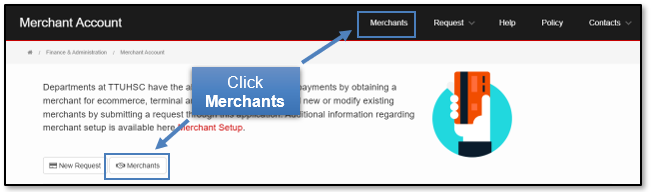
Click either of the Merchants tab to view those merchants associated with your name.
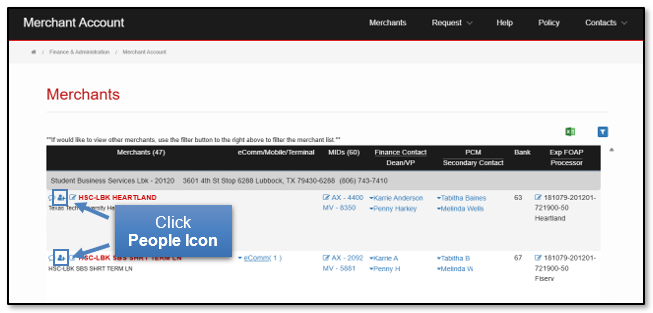
Add Merchant Users by clicking the People Icon by each Merchant on the left side of the page.
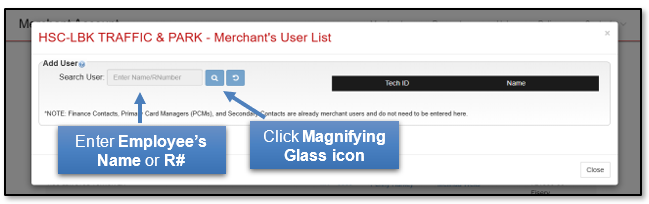
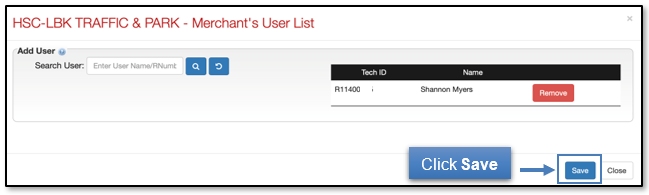
Enter an employee's name or RNumber. Click the magnifying glass icon to begin the search.
Select Add if the employee you want to attach is correct.
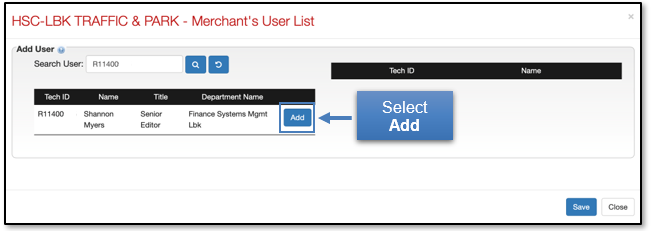
Click Save to confirm the addition of the employee to the Merchant User list.
If you have additional questions, please contact Accounting Services at merchantsID@ttuhsc.edu.
Contact
Finance Systems Management
-
Address:
3601 4th Street STOP 6209 | Lubbock, Texas 79430-6209 -
Email:
fsm@ttuhsc.edu