
Swift Card - Getting Started
The Swift Card Program is a Mastercard Reward card that can be used as a debit or credit transaction to pay participants in patient studies. Payment Services is the administrator of this card program.
The cards have no value until they are activated. Once activated, the participant can immediately use their card wherever Mastercard is accepted.
Departmental Users will be able to sign into the system and activate cards - all you need is an internet connection. The activation process is simple.
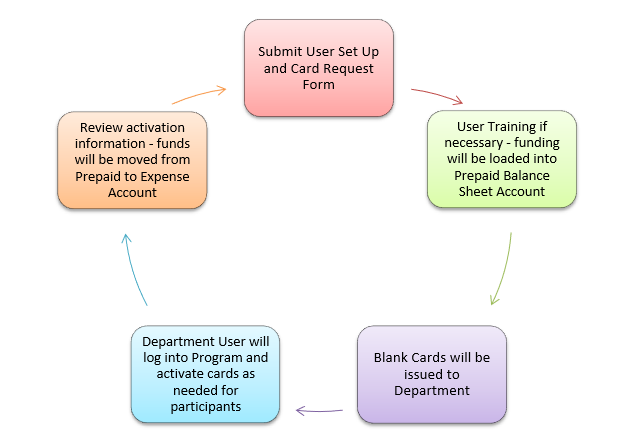
Getting Started
Complete and submit the User Set Up and Card Request Form.
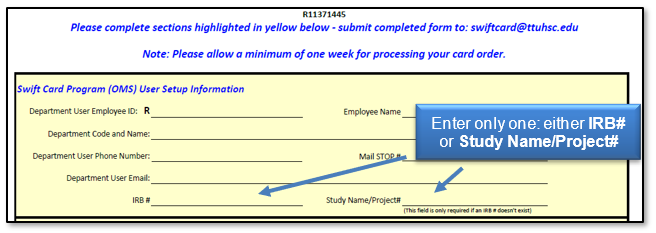
The User Setup section should be completed for the employee who will be activating cards.
For the IRB# and Study Name/Project# fields, only one should be populated. All studies involving human subjects have an IRB#. If you have an IRB#, the Study Name/Project# field should be left blank. If your study doesn't require an IRB#, then please enter a Study Name/Project#.
We are using the date range in the Card Request Information section to determine when you anticipate distributing cards for this order. Cards will be delivered with an expiration date.
To ensure that your participants have sufficient time to use the cards, we are suggesting that you only order enough cards to be distributed within a month or two. Please enter the date you plan to begin activating cards in the Begin Date field. The End Date field should contain the date you estimate that all cards for this order will be disbursed.

A Fund Manager's signature for Approval must be obtained.
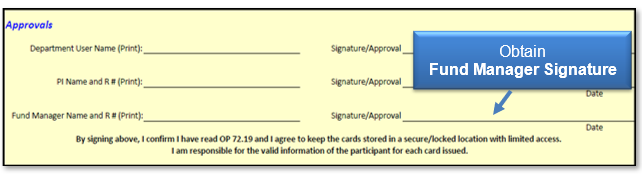
The signature for the Fund Manager must be the employee on file as the Fund Manager in the Banner/TEAM Application for the FOP to Charge for Cards disbursed in the Funding Information section.

The Funding Information must be completed, and funds must be available on both FOPs before we can begin to process your order.
Once we receive your completed card request form via email, we will contact you to schedule training if needed and advise you when your cards will be ready for pickup/delivery. Your user ID and password will be issued once training is completed. At that time, you will have access to the Swift Card OMSi Program to begin activating cards.
Please see the Swift Card Program User Guide for additional information regarding activating cards and creating reports in OMSi.
If you have additional questions, contact Swift Card at swiftcard@ttuhsc.edu.
Contact
Finance Systems Management
-
Address:
3601 4th Street STOP 6209 | Lubbock, Texas 79430-6209 -
Email:
fsm@ttuhsc.edu