
Cash Receipts - Reversal Help
The Cash Receipt system has a reversal feature that is only available to Accounting Services. Users may only request a cash receipt reversal from Accounting Services.
It is very important to use the reversal feature instead of entering a new cash receipt with a negative amount for three reasons:
- The reversing cash receipt will be flagged in the Student Business Service's (SBS) approval screen as a notice that a correcting cash receipt is also being entered. SBS will then locate the associated correcting cash receipt and will approve the two cash receipts together. If you do not use the reversal feature properly, SBS reserves the right to reject the Cash Receipt and require the use of the reversal feature.
- The reversal feature defaults the original cash receipt number as the deposit number. This ensures that the deposit number will remain unique and not cause errors in the Bank Reconciliation system.
- If the reversal is associated with a contract, the Contracting system will automatically update with the negative entries when SBS approves the cash receipt.
To request a cash receipt reversal, send an email to Accounting Services at hscacc@ttuhsc.edu with the CR number to be reversed, the reason for the reversal, and the CR number of the correcting cash receipt.
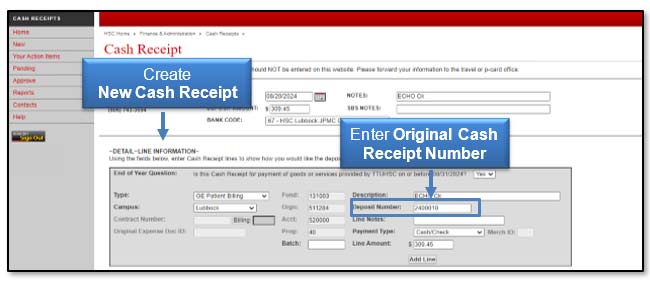
To correct the original cash receipt, you must enter a new cash receipt. Enter the original cash receipt number as the Deposit Number so it can be matched with the reversing cash receipt by SBS and Accounting Services.
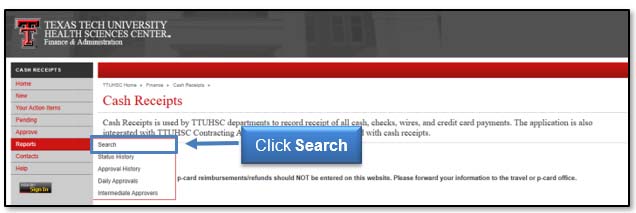
To complete a reversal, click the Search option available from the Reports tab in the menu bar on the left side of the Cash Receipts page.
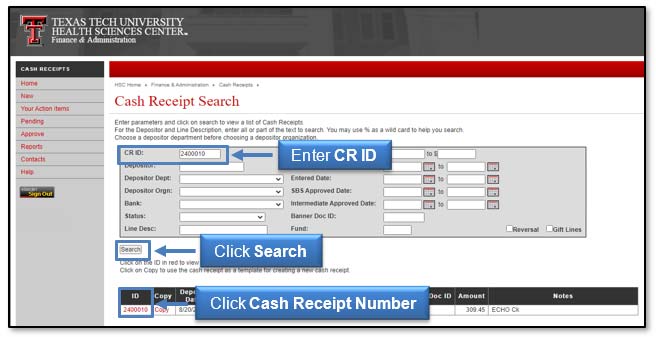
To find the cash receipt you want to reverse, enter the Cash Receipt number in the CR ID field and click Search. Click the red, Cash Receipt number in the ID column to view the cash receipt.
Create a new cash receipt with the original cash receipt number in the Deposit Number field. The new cash receipt will be matched with the reversing cash receipt by SBS and Accounting Services.
Send the Cash Receipt number to be reversed, the reason for the reversal, and the Cash Receipt number of the corrected cash receipt to Accounting Services.
Accounting Services will click the lines you want to reverse using the check box on each line. If you choose a contract, it will automatically check all lines associated with that contract.
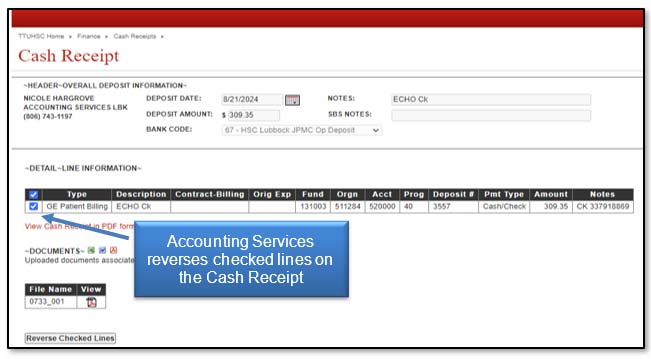
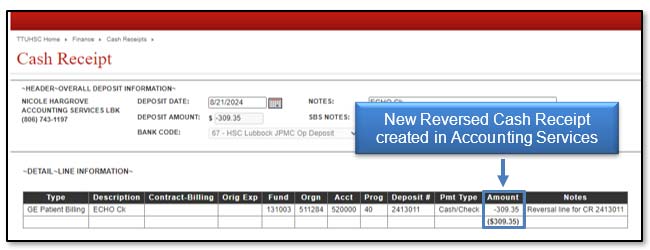
A new cash receipt is created and the information will be pre-populated. The Deposit Number will change to reference the original cash receipt number. Please note that the only information you can edit is the Notes field.
If you have questions about the Cash Receipts Reversal Feature, please contact Student Business Services at (806) 743-7867 or email Student Business Services at SBSCashReceipts@ttuhsc.edu.
Contact
Finance Systems Management
-
Address:
3601 4th Street STOP 6209 | Lubbock, Texas 79430-6209 -
Email:
fsm@ttuhsc.edu