
PCard Training
Overview
The Purchasing Card (PCard) enables a user to make purchases directly from vendors without submitting a purchase order or a Direct Pay. The PCard is not designed to replace the current TTUHSC purchasing process. It is a supplement to that process and an additional delegation of purchasing authority by the fund manager.
The PCard utilizes a MasterCard credit card issued by the State of Texas. The PCard allows for single purchases up to $5,000 and a monthly card limit based on estimated usage. Purchasing policies for transactions still apply to PCard transactions.
Personal Responsibility
To become an authorized PCard user, users are required to complete training before using PCards to ensure understanding regarding proper security and protection, as the PCard can only be used for official TTUHSC-allowed purchases. No personal credit check is required for PCard users.
Users should monitor PCard accounts closely in Emburse Enterprise and verify the proper recording of transactions to Banner FOAPs. Contact US Bank and the PCard Office immediately if:
- You see a transaction that was not authorized.
- You receive two or more declines when trying to process a payment.
- US Bank contacts you to verify transactions.
US Bank notifies users of fraud by email, texts, and other communication methods. The PCard user is the only person who can respond.
To avoid PCard fraud, users should keep the PCard in a locked drawer or safe place when the card is not in use. The card should be returned with the receipt to the cardholder or an identified safe place immediately after the purchase. This can help prevent scammers from hacking into your account.
Any abuse of PCards can result in disciplinary action from TTUHSC that includes liability for unauthorized purchases made on the card and possible termination of employment.
Users should report a lost or stolen card immediately to the following entities:
- US Bank Customer Service, (800) 344-5696
- TTUHSC PCard Program Coordinator, Celeste Medrano, (806) 743-3565
- pcard@ttuhsc.edu
US Bank is 100% liable for fraudulent use after the card is reported lost or stolen.
Obtaining a PCard
The following steps should be followed to apply and obtain a PCard.
Step 1
The PCard Program Application must be completed. Enter all cardholder information, including R number, FOP, campus, Cardholder's Signature, Financial Manager's Signature, and monthly limit.
Obtain authorization from the Financial Manager, including the signature.
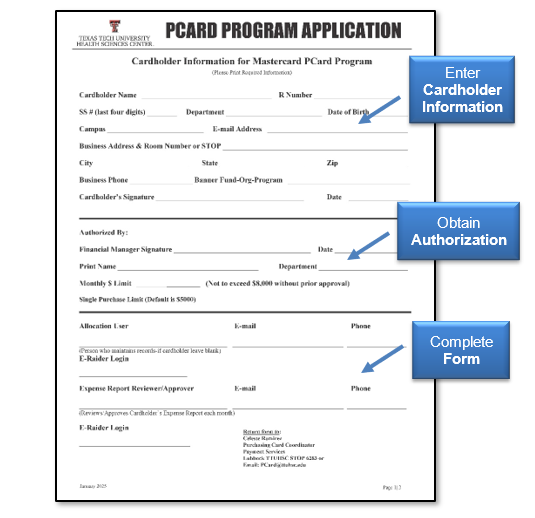
Send the completed PCard Program Application to pcard@ttuhsc.edu.
Step 2
Review this training document to understand PCard utilization and procedures. Read these HSC operating policies associated with the PCard:
- HSC OP 72.16 Officials Functions, Business Meetings, & Entertainment
- HSC OP 72.15 Purchasing Card Program
- HSC OP 72.03 Direct Pay Expenditures
- HSC OP 72.01 Purchasing Supplies, Equipment and Services
Then, complete the PCard Training Questionnaire. You will need to answer 20 questions, validate a review of all documentation, and provide your signature.
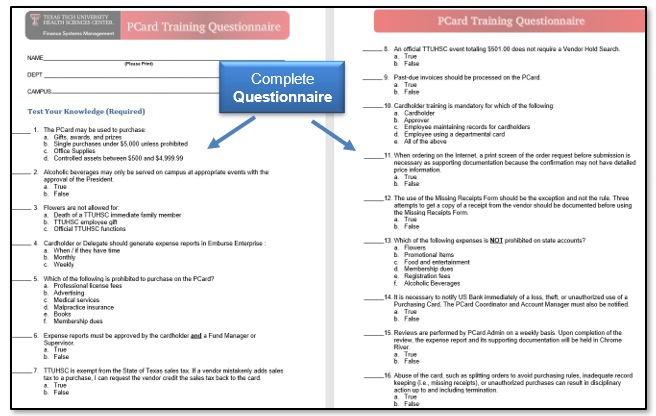
The completed questionnaire should be emailed to pcard@ttuhsc.edu or sent to Payment Services via campus mail:
Payment Services
Lubbock
Campus Mail
Stop 6283
PCard Activation
Once approved, requested PCards will be available in about two weeks. Payment Services will send the PCard to the cardholder. The PCard must be activated upon receipt. See the strip on the card for instructions for activation. The PCard is a US Bank Credit Card, a PIN is required by TTUHSC at the time of activation.
After activation, the PCard can be used for specific payments with vendors accepting US Bank Mastercard payments. US Bank cards provide contactless payment options as well.
PCard Guidelines
The PCard is meant to be used as a supplemental method of purchasing payment for TTUHSC, and therefore, related state and internal policies outline the compliance procedures for utilization of the PCard. These policies include:
- Use of Payment Cards by Texas State Agencies
- HSC OP 72.15 Purchasing Card Program
- HSC OP 72.03 Direct Pay Expenditures
- HSC OP 72.16 Official Functions, Business Meetings & Entertainment
- HSC OP 72.01 Purchasing Supplies, Equipment and Services
- Internal Department Procedures
Purchases on the PCard will fall into one of these categories:
- Permitted Purchases - items for which the PCard is the preferred purchasing method.
- Prohibited Purchases - items you should never buy with a PCard.
- Additional Guidance Purchases - items or certain purchase categories that require a closer check before buying with a PCard.
Prohibited Purchases
Prohibited Purchases are items you should never buy with a PCard. The purchase of any of the items listed on the Prohibited Purchases list must be processed with a purchase order through TechBuy or as a Direct Pay. Any exception must have prior written approval from Purchasing and be filed with all other documentation regarding the PCard transaction.
Prohibited Purchases for the PCard include:
- Awards and Prizes - review HSC OP 72.03
- Blocked Vendors
- Chemicals and other Potentially Hazardous Materials
- Consulting, Medical Services, Personal or Professional Services
- Controlled Assets - prohibited at more than $500, including shipping for most purchases. They are prohibited at any cost for handguns, rifles, machine guns, etc. They are prohibited with a cost between $500 and $4,999.99 for cameras, computers (including peripherals), printers, stereo systems, video recorders/laser disk players (TV, VCR, camcorder), projectors, etc.
- Donations, Contributions and Sponsorships
- eBay purchases
- Individual Amazon Prime Accounts - contact PCard if you need to be added to the Amazon Business account.
- In-State Sales Tax - prohibited items, including Tax on Carry-out or Delivered Meals.
- Lease or Rental of Space
- Medical Licenses for States Other Than the State of Texas
- Payments to Patient/Study Participants
- Supplies - Medical, Pharmaceutical, and Office supplies require the use of the Institutional Supply Contract unless a deviation approval has been received from Purchasing
- Temporary Personnel
- Travel Related Purchases - prohibited travel items include airline tickets, hotel and rental car reservations, restaurant services within a hotel complex, internet services, etc.
- Uniforms - prohibited items include lab coats
Prohibited State and Federal PCard purchases:
- State and Federal Funds - utilizing fund codes with 10XXXX, 11XXXX, 12XXXX, 21XXXX, and 22XXXX
- Alcoholic Beverages
- Food and Entertainment
- Flowers
- Promotional Items
- Membership Dues
Permitted Purchases
All permitted purchases of $5,000 or less must be made using a PCard, provided the vendor accepts credit cards. Purchases of $100 or less do not require deviation approval from Purchasing. An exception to this policy includes medical supplies, pharmaceuticals, and consumable office supplies, which must follow established procurement procedures regardless of dollar amount.
Any exceptions must have prior written approval from Purchasing and be filed with reconciliation documentation. Standard PCard policy still applies regarding permitted and prohibited purchases; refer to HSC OP 72.15.
If purchasing any of the items listed below, the preferred method is the PCard.
- Accreditation, Certification and Examination Fees
- Advertising for Staff Recruitment - specifically in out-of-State Newspapers and online for Staff Recruitment
- Books - permitted if not available through an institutional contract in TechBuy and less than $100
- Equipment - permitted if not available through an institutional contract in TechBuy
- Flowers - for Official TTUHSC Functions, or for Employees and Immediate Family Members in cases of illness or death. Provide the employee's and the recipient's name and their relationship to the employee. If for a death in the family, submit a death notice or obituary.
- Food and Entertainment - purchases for these categories must be documented properly in Chrome River. Use the Food and Entertainment Substantiation Form and Pre-Approval Form to include all required sections, especially sections including the date and location of an event. Make sure to include all attendees. If more than ten guests, you can upload an attendees list as supporting documentation. You will need to provide proper details such as:
- Amount
- Time, place, and description of entertainment
- Business purpose (clear and specific) and the event benefit to TTUHC and/or the State of Texas
- Business relationship of a person(s) is entertained, such as name, title, and occupation.
- Magazine/Journal Subscriptions
- Malpractice Insurance
- Membership Dues - an organization must be on the Professional Membership List for payment of Membership Dues
- Notary Applications
- Professional License Fees
- Registration Fees
Additional Guidance Purchases
Additional Guidance Purchases are items or certain purchase categories that require a closer check before buying with a PCard. The items and categories have additional requirements that must be met before using a PCard for the purchase.
Related policies and forms are noted where applicable to assist with procedures to comply with the additional purchase requirements.
- Alcoholic Beverages - may only be served on campus at appropriate events with prior written approval of the President or Designee.
- Gifts - gifts for the length of service, including retirement (<$400), and non-cash gifts for donors or participants of official functions must include the document, OP 72.03 Attachment B
- IT Purchases - all IT Purchases, including software and software licenses, must be approved by the IT department. Requests for approval can be made through Purchasing@ttuhsc.edu. Evidence of approval must be submitted with the expense documentation.
- Other Shipping Location than TTUHSC Address - shipping items purchased with the PCard to a location other than an official TTUHSC address requires approval from Purchasing.
- PayPal Services - all purchases must match the vendor and descriptions that are posted to the monthly PCard statement.
PCard Reminders Before Ordering
A Vendor Hold Search must be completed for all anticipated PCard transactions of more than $500 to ensure a vendor is in good standing with the State of Texas. Utilize the Vendor Hold Search system to search by vendor name or Texas Identification Number (TIN). Vendors in a state hold for debts are not allowed on the PCard. PCard transactions of more than $500 must have a Vendor Hold Search attached.
PCard purchases should be applied for payments at the time of orders. Do NOT use the PCard to pay past due invoices, as that process requires issuing a purchase order with a non-compliant form attached. Sales tax (State of Texas) for an invoice must be credited by the vendor or personally reimbursed to TTUHSC. Complete and submit to the vendor a Tax Exemption Form when needed. Ask the vendor for an itemized invoice or receipt. The documentation will be required to submit PCard purchases.
Supporting Documentation
Submit the required documentation to comply with record-keeping requirements, including:
- Expense Report with appropriate approvals
- Invoice/sales receipt from the vendor and/or print screen before submission for online orders
- Business purpose and benefit to TTUHSC must be provided in Emburse Enterprise. Detailed descriptions are recommended.
Remember, some items purchased using the PCard require submission of additional documentation or information.
- Flowers - provide the employee's and recipient's name and their relationship to the employee. If for the death in a family, submit a death notice or obituary.
- Food and Entertainment - provide the Food and Entertainment Substantiation Form and Pre-Approval Form.
- Membership Dues - provide the enrollment form detailing the charges for the type of dues or the renewal notification/invoice.
- Registration - provide an order form or screenshot detailing the charges for the conference attended.
- Other Items (if applicable) - provide the vendor hold screenshot, the Pre-Approval Form, the deviation approval from Purchasing, a copy of the advertisement, and/or the credit receipts.
Each receipt or invoice must reflect the required information to support the purchase as a legitimate state expense. The information required on a receipt or invoice includes:
- Last four numbers of the credit card - if the full 16-digit card number is notated on any supporting document, block out the first ten digits of the card and the three-digit security code.
- Amount
- Date
- Merchant Name
- Sales Tax
PCard Transactions
Reimbursement
To receive reimbursement for PCard transactions, the check or cash must be sent to the PCard Coordinator for correct processing. A Cash Receipt (CR) form will be completed by the PCard Coordinator immediately upon receiving the payment and submitted to the Bursar's office. The FOAP used must match the original transaction as it was processed in Banner. A copy will be made for the cardholder's folder and also sent to the department.
When sending a reimbursement, please make sure to indicate who is sending the reimbursement and where it should be applied.
Note: All campuses must send reimbursements to the PCard Coordinator for processing. Send via campus mail to: Celeste Medrano at STOP 6283.
Missing Receipts
Cardholders must attempt to receive a copy of the original receipt documentation for PCard purchases. Three attempts to get the copy must be documented. If unsuccessful, a PCard Missing Receipts Form must be completed with the Account Manager and/or Supervisor signature required. Keep this form with other required documentation for your PCard purchase.
Missing receipts should be a rare occurrence and will be carefully scrutinized in reviews.
Reports
Weekly Expense Reports
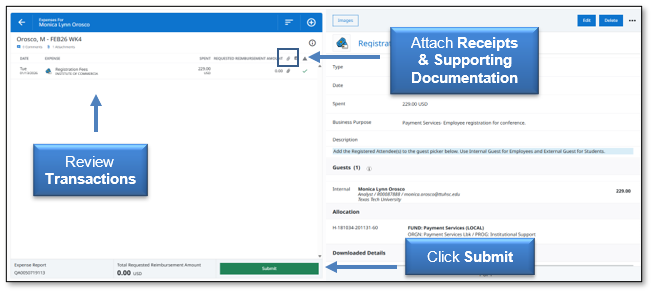
PCard users will generate a weekly Expense Report from Emburse Enterprise. Review all transactions to verify true and accurate charges. Attach the matching receipts and the supporting documentation for each transaction. Once the report is complete, click Submit.
Allocations
When completing the PCard report in Emburse Enterprise, allocations to the FOP will be made and approvers should verify the FOP for accuracy. Check the account code for each transaction to ensure it accurately describes your purchase. Allocations should be completed daily or weekly in Emburse Enterprise.

Cost transfer requests after the PCard upload has been expensed in Banner should be a rare occurrence due to the ability to allocate transactions in Emburse Enterprise. The Financial Transaction System (FiTS) Cost Transfer should be used to submit all cost transfer requests. The Cost Transfer Form must be used to change an account code for a current FY expenditure. For additional information, contact hscacc@ttuhsc.edu.
Disputed Items
Users must first try to resolve any disputed items regarding PCard transactions by calling the vendor. If the items are not resolved with the vendor, contact US Bank Customer Service at (800)344-5696 to dispute the transaction.
Note: If disputing a U.S. vendor item, the claim must be completed within 60 days from the cycle end date of the expense report.
Report Due Dates
PCard previous day's transactions are reviewed daily. The monthly PCard Update will announce the due date for each weekly Expense Report, and when it is expected in Payment Services. Upon final completion of the review, the Expense Report and its supporting documentation will be held in Emburse Enterprise.
PCard Cancellation
To cancel a PCard, send a cancellation notification stating a reason such as employee separation, extended leave, or department transfer to pcard@ttuhsc.edu. The PCard should be cut in half and returned with a written card cancellation request to the PCard Coordinator, Celeste Medrano, at STOP 6283.
An Account Manager has the obligation to reclaim a PCard from a terminated employee and return the credit card to the PCard Coordinator. Any fraudulent charges incurred between an employee's termination date and card cancellation date do not have liability coverage. To allocate any unresolved transactions, contact the PCard Coordinator, Celeste Medrano, (806) 743-3565 as soon as possible for instructions.
Additional Questions
If you have additional questions, contact Payment Services at: pcard@ttuhsc.edu.
If you need immediate assistance with the PCard, contact US Bank customer service at (800)344-5696.
Contact
Finance Systems Management
-
Address:
3601 4th Street STOP 6209 | Lubbock, Texas 79430-6209 -
Email:
fsm@ttuhsc.edu