
Steps to Requesting a Solicitation
The TTUHSC Purchasing Office, has the responsibility of assisting departments in making the best value acquisition of quality materials and services in accordance with Texas procurement laws. Any purchase $100,000.01 and higher may require a competitive, formal solicitation (e.g., Bid, RFP, RFI).
The solicitation process requires active engagement from the requesting department. The department-designated Point of Contact will be responsible for communicating and working in tandem with the Purchasing Office Solicitation Manager assigned to the solicitation.
Note: The Solicitation Process may take anywhere from 30 to 90 days (or more) depending on the complexity of the product or service TTUHSC is seeking and the timeliness of actions required of the department.
Compile in Advance
- Estimated Budget for Purchase
- FOAP Information - Funds will be set aside for purchase
- Service and/or Product Need - Specifications required by the department for purchase
- Assign a Departmental Point of Contact - This person will project manage the entire solicitation project and work directly with Purchasing for all solicitation needs
- Optional: Vendors (names and email addresses) the department wishes to invite to participate in the solicitation
Create a Solicitation Requisition
Write down the requisition number (to be used later in the process). The requisition will evidence workflow approvals (i.e., Fund Manager Approval).
Step 1: Navigate to the TechBuy - Shopping Homepage
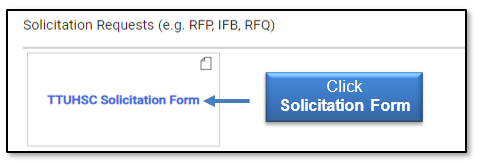
Step 2: Click Solicitation Form located under Solicitation Requests at the bottom of the homepage.
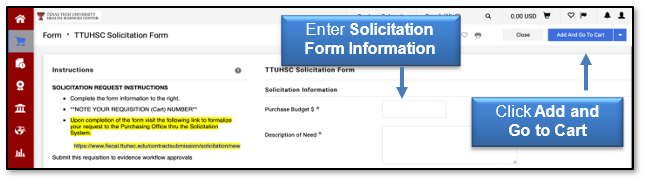
Step 3: Fill out Solicitation Information, then click Add and Go to Cart > click Proceed to Check-out > Update Requisition Information > Submit Requisition.
Step 4: Write down the Requisition Number.
Formalize Solicitation Request to Purchasing - Submit to Solicitation System
Step 1: Navigate to Contracting System New Solicitation.
Step 2: Fill out the requested information. Required detail fields on the solicitation form are indicated by red asterisks.
- TechBuy Requisition #: Insert the required requisition number.
- Specification Document: Upload a Word document outlining the Service and/or Product details that the department requires. Only one file can be attached. Contact contracting@ttuhsc.edu if you need to submit additional required documentation.
- Short Description of Need: Write one to two sentences stating what the department wishes to purchase.
- Vendors to be Notified: This field is optional. List the vendor(s) (name and email address) that the department would like to ensure are notified of the solicitation.
- Approved Budget Allocation: Enter the Fund Manager's Approved Budget.
- Preferred Posting Date: The Preferred Posting Date is 1 to 2 weeks after the solicitation is requested.
- Preferred Closing Date: The Preferred Closing Date is a minimum of 21+ days for vendors to respond.
- Point of Contact: Enter or search for the Department Point of Contact. This person will work with the Purchasing Office Solicitation Manager.
Step 3: Click Submit.
Once these steps have been completed, the Procurement Team will be in touch within 48 hours to assign a Solicitation Manager to your request.
If you have additional questions, contact Contracting at contracting@ttuhsc.edu.
Contact
Finance Systems Management
-
Address:
3601 4th Street STOP 6209 | Lubbock, Texas 79430-6209 -
Email:
fsm@ttuhsc.edu